콜백리뷰
콜백함수란 ? 다른 함수의 전달인자로 넘겨주는 함수 !
상황에 따른 콜백
- callback in action: 반복 실행하는 함수 (iterator)
Ex1) 예제
[1, 2, 3].map(function(element, index) {
  return element * element;
});
- callback in action: 이벤트에 따른 함수 (이벤트 핸들러)
Ex2) 예제
document.querySelector('#btn').addEventListener('click', (e) => {
  console.log('button clicked');
});
콜백을 실행할때는 함수 실행을 연결하는 것이 아닌 함수 자체를 연결해야함!!
Ex3) 이렇게 콜백쓰면 뚝배기 깨진다
function handleClick(){
    console.log('button clicked');
}

document.querySelector('#btn').onclick = handleCLikck; // good

document.querySelector('#btn').onclick = function() { handleClick()} // good

document.querySelector('#btn').onclick = hancleClick.bind() // bind메소드는 새로운 함수를 생성

document.querySelector('#btn').onclick = handleClick() //!!!! 함수 실행을 연결하지 말기!
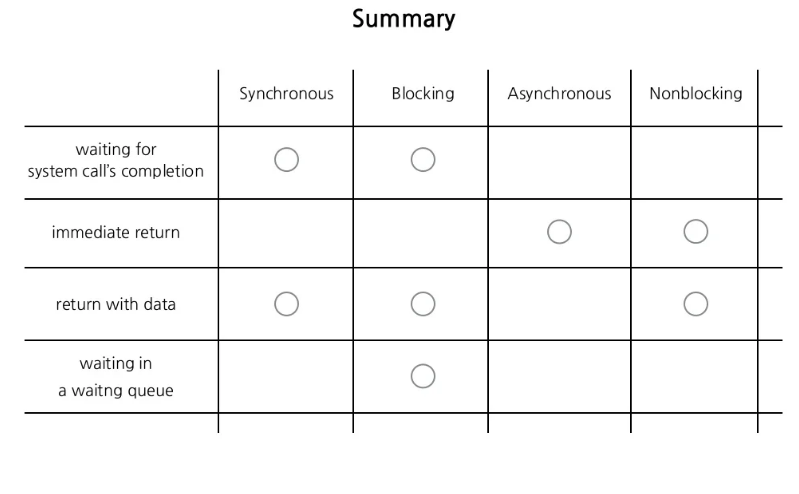
blocking vs non-blocking 그리고 Sync Async
Blocking/NonBlocking은 호출되는 함수가 바로 리턴하느냐 마느냐가 관심사다. 프로그램 실행의 순서 관점에서
- NonBlocking은 호출된 함수가 바로 리턴해서 호출한 함수에게 제어권을 넘겨주고, 호출한 함수가 다른 일을 할 수 있는 기회를 줄 수 있다. 하던 일을 멈추고 전화를 받아야 한다.
- Blocking은 호출된 함수가 자신의 작업을 모두 마칠 때까지 호출한 함수에게 제어권을 넘겨주지 않고 대기하게 만든다 확인후 나중에 답장할 수 있다.
Synchoronous/Asynchronous는 호출되는 함수의 작업 완료 여부를 누가 신경쓰냐가 관심사다 결과물을 돌려받을 시점에서
- Synchoronous는 system call이 끝날때까지 기다리고 결과물을 받는다. 요청에 대한 결과가 동시에 일어난다.
- Asynchoronous는 system call이 완료되지 않아도 나중에 완료가 되면 그때 결과물을 가져온다. 요청에 대한 결과가 동시에 일어나지 않는다.

비동기의 주요 사례
- DOM Elemenet의 이벤트 핸들러
- 타이머 API
- 서버에 자원 요청 및 응답 등
그래서... 비동기가 좋은것은 알겠는데...
그 순서를 제어하고 싶은 경우에는 어떻게할까? 우선 콜백!
콜백과 비동기
Ex4-1) Callback 안쓰면 순서가 지맘대로
const printString = (string) => {
    setTimeout (
        () => {
            console.log(string)
        },
        Math.floor(Math.random() * 100) + 1
        )
}

const printAll = () => {
    printString("A")
    printString("B")
    printString("C")
}
printAll(); // 결과가 매번 다르게 나옴...
Ex4-2) Callback을 쓰면 어떨까?
const printString = (string, callback) => {
    setTimeout (
        () => {
            console.log(string)
            callback()
        },
        Math.floor(Math.random() * 100) + 1
        )
}

const printAll = () => {
  printString("A", () => {
    printString("B", () => {
      printString("C", () => {})
      })
      })
      }
printAll();

항상 A, B, C
Ex 5-1) Callback error handing Design
const somthingGonnaHappen = callback => {
  waitingUntilSomethingHappens()

  if (isSomethingGood) {
    callback(null, something)
  }

  if (isSomethingBad) {
    callback(something, null)
  }
}
Ex 5-2) 사용자를 고려한 콜백 Usage
somethingGannaHappen( (err, data) => {
  if (err) {
    console.log('ERR!');
    return;
  }
  return data;
})
Callback hell을 벗어나는방법? Promise !
Promise!
'코딩공부 > T.I.L' 카테고리의 다른 글
| 2022-01-25 Node.js 모듈 사용법 (0) | 2022.01.25 |
|---|---|
| 2022-01-25 타이머 API (0) | 2022.01.25 |
| 2022-01-24 비동기 intro (0) | 2022.01.24 |
| 2022-01-21 자료구조/ BFS & DFS (0) | 2022.01.21 |
| 2022-01-21 Tree traversal (0) | 2022.01.21 |